1. Export a CSV file from Krock.io
To export comments from Krock.io, select the video and open the menu via the three dot icon. Select "Export comments to csv" to export the comments.
2. Use the "Convertisseur de marqueurs" to convert the CSV file into a CSV file
Open the free Convertisseur de marqueurs, select "Krock.io > Comments (.csv)" and set "convert" to "CSV for Google Sheets". Generate and download the file. Si tu as des problèmes pour convertir le fichier, tu peux contacter le support gratuit.
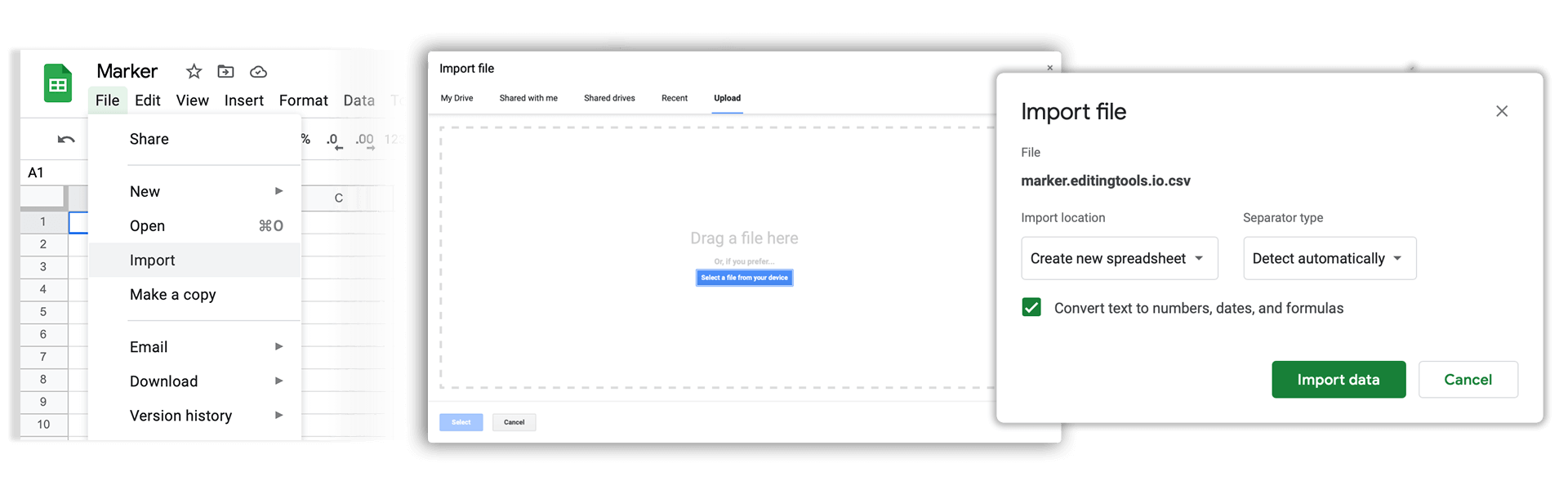
3. Import the CSV file into Google Sheets
Open Google Sheets and go to "File -> Import". Upload the generated CSV file and press "Import Data" to generate the Sheet with all markers.
🚀 Terminé
C'est tout pour le moment ! Si ce tutoriel t'a été utile, partage-le pour nous soutenir. Si tu as des suggestions pour améliorer le workflow, fais-le-nous savoir !